
One central list
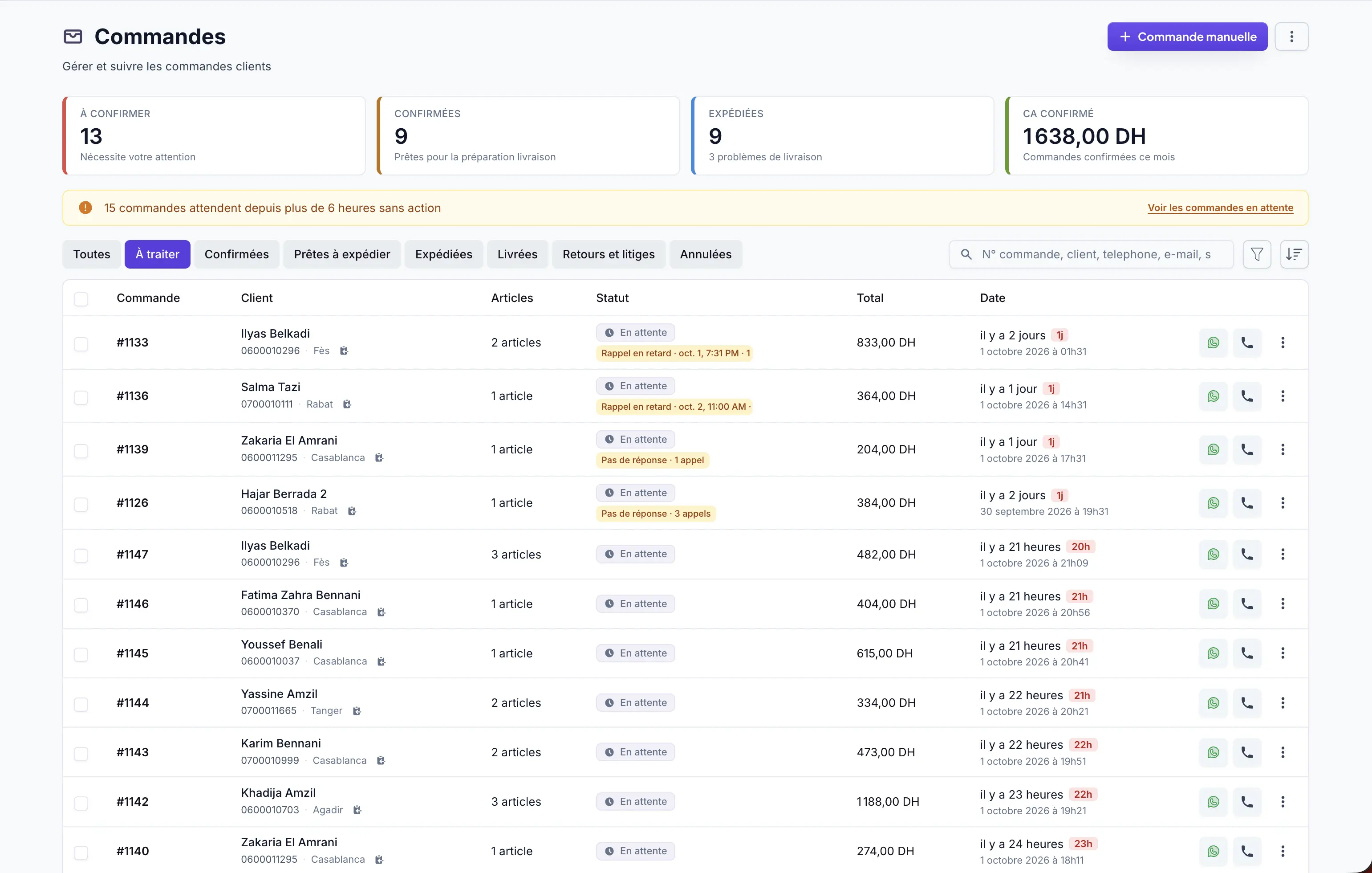
Store orders live together instead of being scattered across chats and spreadsheets.
Every order placed on your storefront arrives in a structured dashboard with the customer, products, quantities, total and the information needed to process it.
Store orders live together instead of being scattered across chats and spreadsheets.
Statuses, search and filters help you quickly see what needs attention.
Customer, address, products, variants, quantities, prices and notes stay attached to the order.
Sellioly provides the current operational foundation for centralizing COD orders and moving them through your workflow.
The customer submits the COD checkout on your store.
Customer and product information arrives in Sellioly automatically.
Use statuses, notes and actions to move the order forward.
Assign a delivery company and export data when needed.
Sellioly is developing a deeper WhatsApp/AI confirmation layer. This page describes current order-management capabilities and does not present that automation as generally shipped.
Sellioly can open a prefilled WhatsApp message using the order information.
Yes. Search, filters and statuses help you find the orders that need attention.
Not yet. Current delivery support includes assignment/export; deeper carrier synchronization is a separate product priority.
Centralize your next COD orders in Sellioly.
Create my account30 days free · No commitment